How to Use LinkedIn Without the Feed
LinkedIn opens straight into the feed, and there's no setting to change that. Here's how to use LinkedIn for messages, jobs, and profiles without the feed on iPhone.
LinkedIn has one job for most of us. You're checking a message from a recruiter, looking someone up before a call, or seeing whether a role is still open. None of that involves the feed. The feed is exactly what you get when the app opens.
Why LinkedIn puts the feed first
LinkedIn's feed carries promoted posts and suggested content from outside your network, and time spent there's what the advertising business is built on. Its URL, linkedin.com/feed/, is the app's front door, and no setting moves it.
You can hide individual posts, unfollow people while staying connected to them, and mute suggested content when the option appears. These help at the margins. None of them stop the feed being the first thing you see when you open the app.
Removing the feed
Unspiral opens LinkedIn's mobile site with rules applied on your device. There are three controls:
| Control | Default | What it does |
|---|---|---|
| No Home tab | Off | Removes the Home tab entirely, so LinkedIn opens without a feed. |
| Hide promoted & suggested posts | On | Strips promoted posts and out-of-network suggestions. |
| Count posts seen | On | Counts how many posts you scrolled past today, reset at midnight. |
LinkedIn also prompts you to install the native app repeatedly on mobile web. Unspiral dismisses that automatically.
Open LinkedIn from the Home tab
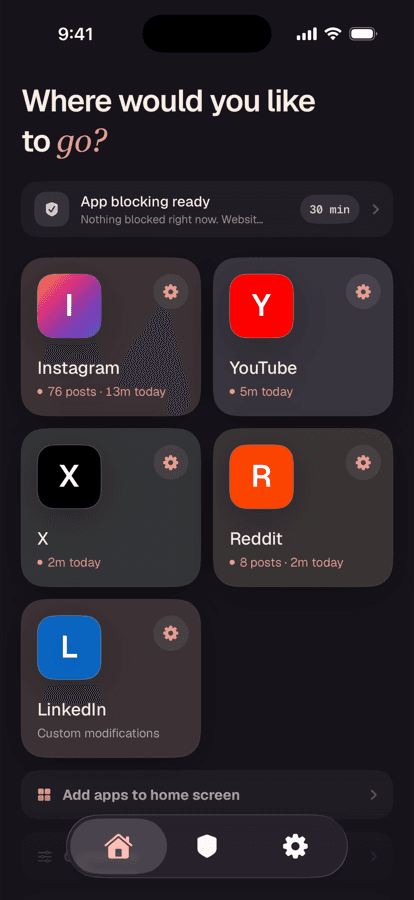
Tap LinkedIn in Unspiral and sign in on LinkedIn's own page. Unspiral doesn't receive your LinkedIn credentials.
Switch on No Home tab
Open Settings → Website Controls → LinkedIn and turn on No Home tab. Messaging, jobs, notifications, search, and profiles all keep working. The feed is simply not one of the places you can land.
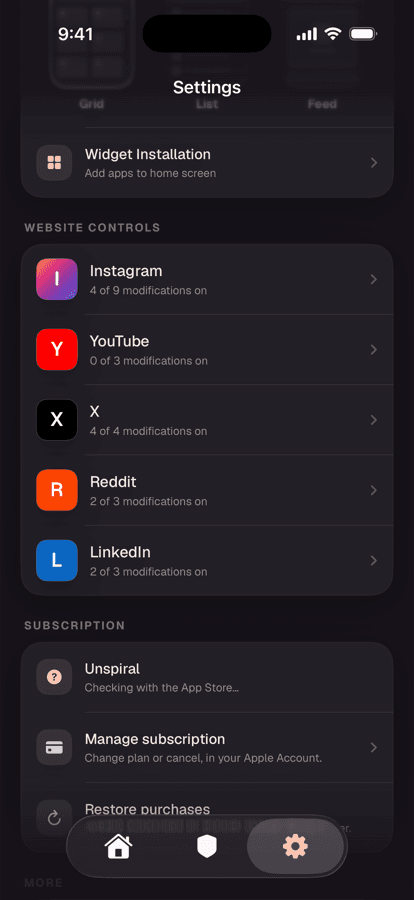
LinkedIn ships at 2 of 3. No Home tab is the one you opt into.
The alternatives
Unfollow instead of disconnect. You can unfollow a connection and stay connected, which empties the feed over time without damaging your network. This is the best purely native option and it costs nothing. It's just slow, and the suggested content keeps coming regardless.
Bookmark the pages you actually use. Saving linkedin.com/messaging or linkedin.com/jobs and opening those directly skips the feed entirely. Free, immediate, and it works in any browser, though nothing stops you tapping Home once you're in.
Screen Time limits. A limit or Downtime schedule for LinkedIn works as a boundary, but blocks the messages and job listings along with the feed.
What you give up
LinkedIn's mobile website covers messaging, jobs, notifications, search, profiles, and posting. Some recruiter and Sales Navigator tooling is desktop- or app-first, and native push notifications don't carry across. If your job depends on those, keeping the native app for work hours and using the website the rest of the time is a sensible arrangement.
For the same treatment on a noisier site, see how to use Reddit without the home feed.
Frequently asked questions
Can you turn off the LinkedIn feed?
LinkedIn provides no setting to disable the feed or change which tab the app opens to. You can hide individual posts and unfollow people while remaining connected, but the feed remains the landing screen. Unspiral's No Home tab control removes it on your device.
How do I use LinkedIn just for messages?
Turn on No Home tab in Unspiral's LinkedIn settings, which removes the feed while leaving messaging, jobs, notifications, and profiles working. Without a third-party app, bookmarking linkedin.com/messaging and opening it directly is the simplest way to skip the feed.
Does hiding the LinkedIn feed stop me posting?
No. Posting, commenting, and replying to messages all continue to work. Only the surface where you read other people's posts is removed.
Will unfollowing people empty my LinkedIn feed?
Unfollowing connections while staying connected does reduce feed content over time, and it's the best option available inside LinkedIn itself. It doesn't remove promoted posts or suggested content from outside your network, and it doesn't stop LinkedIn opening on the feed.