How to Turn Off YouTube Recommendations
How to turn off YouTube recommendations on iPhone, from pausing watch history to removing the suggested video sidebar entirely.
YouTube's recommendation engine is genuinely one of the most effective pieces of software ever built. That's the problem. You go to watch one tutorial and the next video is queued before the credits, chosen specifically because people like you kept watching.
Option 1: pause watch history
Go to You → Your data in YouTube → YouTube watch history and turn it off. You can clear the existing history at the same time.
The effect is immediate and dramatic. The home feed goes nearly blank and the sidebar loses most of its personalization. If you've ever wanted to see what YouTube looks like without a decade of your own behavior feeding it, this is how.
The costs are real though. You lose the ability to find that video you watched last month and can't name. Recommendations you actually valued disappear along with the ones you didn't. And YouTube will ask you to turn it back on, repeatedly.
Option 2: prune the signals
A middle path that keeps history working:
- Remove individual videos from history. Under Your data in YouTube, delete specific things you don't want shaping recommendations. Useful after one late-night rabbit hole poisons your feed for a fortnight.
- Use Not interested and Don't recommend channel. Tap the ⋮ on any suggestion. Don't recommend channel is much stronger than Not interested and underused.
- Unsubscribe honestly. Channels you never watch still generate home feed noise. If you haven't watched one in six months, it's decoration.
- Watch while signed out for one-off rabbit holes. Nothing you watch signed out feeds your recommendations.
Option 3: remove the surfaces
The most direct approach is to stop the recommendation surfaces rendering at all. In Unspiral, YouTube has three controls, and Hide recommended videos is the significant one.
| Control | Default | Effect |
|---|---|---|
| Hide recommended videos | Off | Removes suggested videos, including the post-video sidebar |
| Hide comments | Off | Removes the comment section |
| Background play | Off | Keeps audio playing when you leave the page |
Shorts and ads are hidden automatically and aren't toggles. All three of the controls above ship off, because turning them on makes YouTube meaningfully less like YouTube and that shouldn't happen to you unasked.
Open YouTube's website controls
In Unspiral, go to Settings → Website Controls → YouTube. It'll show 0 of 3 modifications on until you change something.
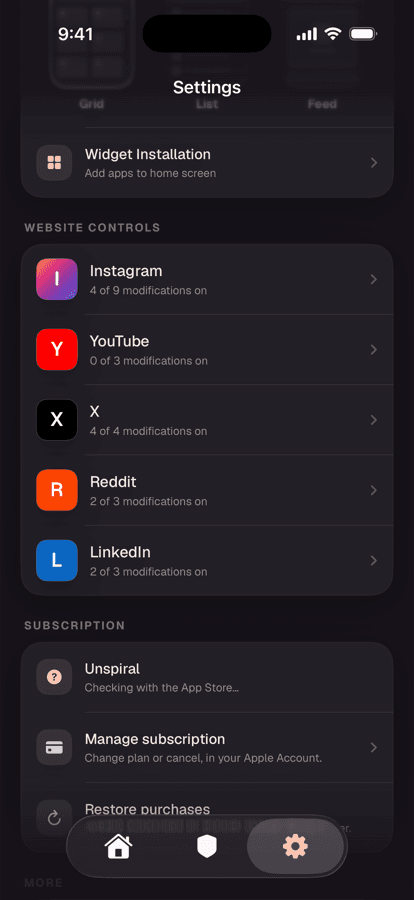
YouTube ships with nothing enabled beyond the always-on Shorts and ad hiding. Turn on Hide recommended videos
YouTube becomes a search box and your subscriptions. You watch the thing you came for, and when it ends there's nothing waiting to autoplay you into the next hour.
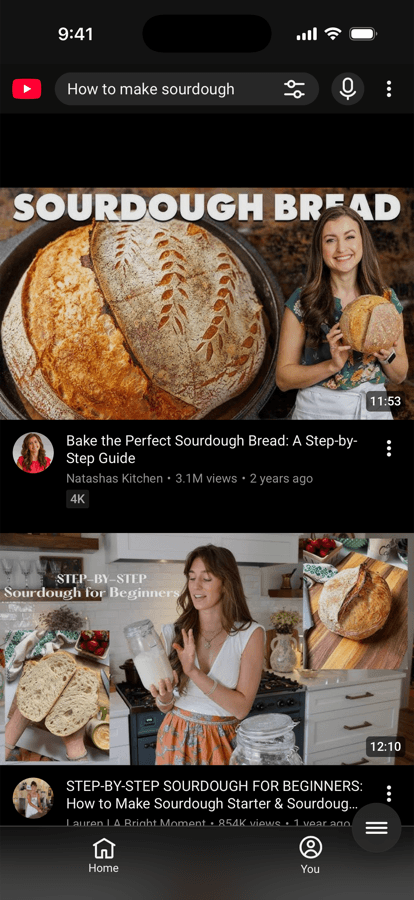
Search still works normally. See also how to block YouTube Shorts.
Turn off autoplay while you're here
Whatever else you do, turn off autoplay. It's the toggle at the top of the up-next list in the native app, and it's the difference between choosing your next video and having it chosen for you. It takes three seconds and it's the highest return-per-effort change on this page.
Frequently asked questions
How do I turn off YouTube recommendations?
Pausing watch history under You, Your data in YouTube is the strongest native option and empties the home feed almost entirely. For a targeted approach that keeps history and search working, Unspiral's Hide recommended videos control removes the suggestion surfaces including the post-video sidebar.
Does pausing watch history delete my history?
Pausing stops new entries being recorded but doesn't delete existing ones. Clearing history is a separate action offered on the same screen, and you can pause without clearing if you want to keep past videos findable.
How do I stop YouTube recommending a specific channel?
Tap the three-dot menu on any video from that channel and choose Don't recommend channel. This is considerably stronger than Not interested, which applies to a single video rather than the source.
Can I use YouTube as just a search engine?
Yes. Turning on Hide recommended videos in Unspiral leaves search and subscriptions working while removing the suggestion surfaces, so YouTube behaves like a video search tool rather than a feed.
Does turning off autoplay stop recommendations?
No. Autoplay controls whether the next video starts on its own, but recommendations still appear in the sidebar, on the home feed, and after a video ends. Turning autoplay off is still worth doing, as it restores the decision to you.