How to Use Instagram Just for Messages
If Instagram is really a messaging app for you, here's how to use it for DMs only on iPhone, with the feed, Reels, and Explore out of the way.
Ask people why Instagram is still on their phone and a surprising number give the same answer. It's where their friends are. Not the feed, not Explore, not Reels. The messages.
Which makes Instagram an awkward app to quit, because the thing you want is bundled with four things you don't. Meta has no interest in unbundling that for you, so it falls to you to do it.
Why Instagram won't give you this
Meta already knows a large slice of its users are there mostly for DMs. That's precisely why the feed sits between you and them. Every trip to your inbox is routed past content designed to keep you from arriving, which is a reasonable business decision and a bad experience.
There is no setting for this. There has never been a setting for this, and I wouldn't expect one.
What you can do natively
- Turn off every notification except Direct. Under Settings → Notifications, switch off likes, comments, follows, and suggestions, leaving messages on. This is the single highest-value free change here, because most feed sessions start with a notification that wasn't about a message.
- Use the Following feed. Tap Instagram at the top of home and pick Following. Quieter while you're in it, though it resets when you reopen the app.
- Move the app off your home screen. Into the App Library, so opening it takes deliberate effort rather than a thumb landing in a familiar spot.
Together these help. What none of them do is stop the feed being the first thing you see when you open the app.
Turning Instagram into a messaging app
Unspiral opens Instagram's mobile site and applies display rules on your device. The relevant control is DMs only, which limits Instagram to messages by hiding the other navigation.
Open Instagram inside Unspiral
Tap Instagram on the Home tab and sign in on Instagram's own web page. Unspiral never receives your username, password, or messages.
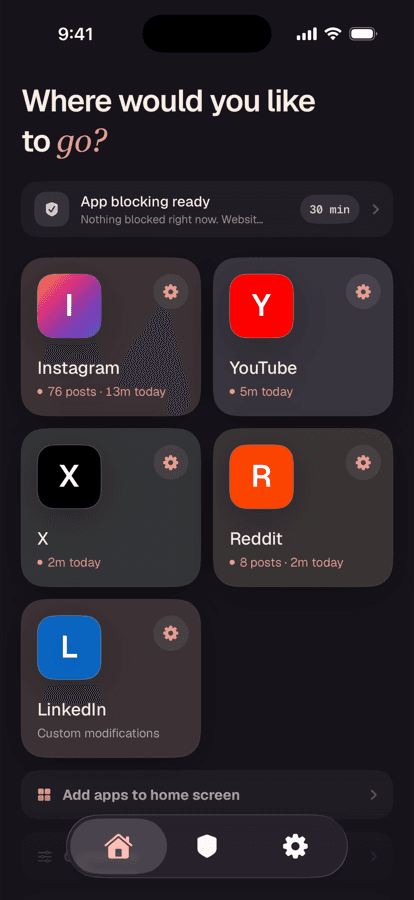
Switch on DMs only
Tap the gear icon in the top-left to open Instagram Settings, then turn on DMs only. Reels are already hidden by default, so this closes the remaining routes into the feed.
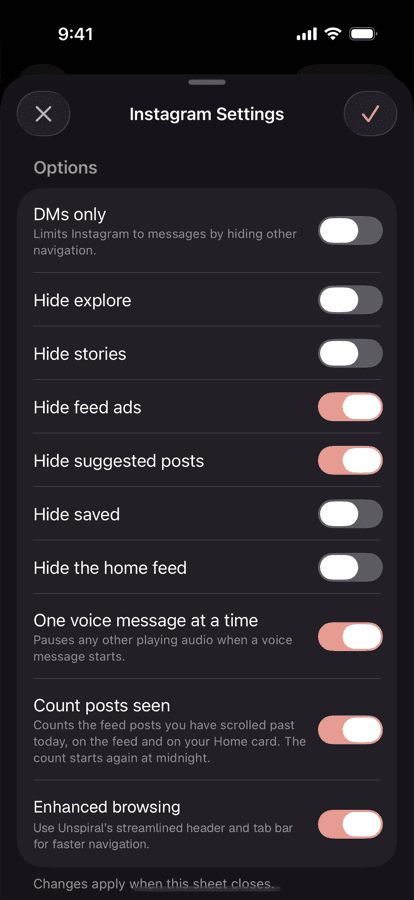
DMs only sits at the top of the sheet, above Hide explore and Hide stories.
What still works, and what doesn't
Text messages, photo and video messages, voice messages, group chats, and message requests all work on the mobile site. So does sending a post to someone.
The real losses are push notifications for new messages, since the website can't deliver those, and voice or video calling. If you need instant message alerts, the usual arrangement is to keep the native Instagram app installed for notifications and do the actual reading and replying in the quieter version.
One nice detail if you use voice messages: One voice message at a time is on by default, which pauses any other audio when a voice message starts, instead of the native app's habit of layering them.
Frequently asked questions
Can you use Instagram for messages only?
Instagram has no built-in messages-only mode. You can get close natively by disabling all notifications except Direct, but the feed remains the landing screen. Unspiral's DMs only control limits Instagram to messages by hiding the other navigation.
Is there a separate Instagram messages app?
There's no standalone Instagram DM app for iPhone. Instagram messages are also reachable through Facebook Messenger if the accounts are linked, though that brings its own feed and notifications rather than removing them.
Will I still get message notifications?
Not from the mobile website, which can't deliver iOS push notifications. Many people keep the native Instagram app installed purely for message alerts and do their actual messaging in the quieter version.
Do voice messages and group chats work?
Yes. Text, photo, video, and voice messages, group chats, and message requests all work on Instagram's mobile site. Voice and video calling is a native-app feature and isn't available.