How to Quit Instagram Without Losing Your DMs
Deleting Instagram means losing your messages. Here's how to leave the feed behind while keeping your DMs, including how to export your data first.
You've decided Instagram isn't worth what it costs you. Then you think about the group chat, the person you only talk to there, the message thread going back six years, and the whole plan quietly stalls.
This is the single most common reason people fail to leave Instagram, and it has almost nothing to do with willpower. Your messages are hostages.
Export your messages first
Do this before anything else, and do it even if you end up not leaving. It takes two minutes and the download can take days to arrive.
- Go to Settings → Accounts Center → Your information and permissions → Download your information.
- Request a download, choosing your Instagram account.
- Select Messages at minimum. Photos, videos, and posts are worth including if you have anything you'd miss.
- Choose HTML if you want to actually read it, or JSON if you plan to process it. HTML is right for almost everyone.
Meta emails you a link when it's ready, which can take anywhere from a few hours to a few days depending on how much you have. Wait for it to arrive and check the file opens before you delete anything.
Deactivate or delete
| Deactivate | Delete | |
|---|---|---|
| Profile visible | No | No |
| Messages kept | Yes, restored on return | No, removed with the account |
| Reversible | Yes, any time | Only within 30 days |
| Username held | Yes | No, released |
| Others see your past messages | Yes, in their inbox | Yes, but shown from a deleted user |
One thing people misunderstand: deleting your account doesn't remove your messages from other people's inboxes. The text you sent stays in their thread. What you lose is your own copy and your ability to reply.
Deactivation is under Settings → Accounts Center → Personal details → Account ownership and control → Deactivation or deletion. Both options live in the same place.
The option most people actually want
If you're honest that the feed is the problem and the messages are the reason you stay, then leaving is the wrong shape of solution. You'd be giving up the part that works to escape the part that doesn't.
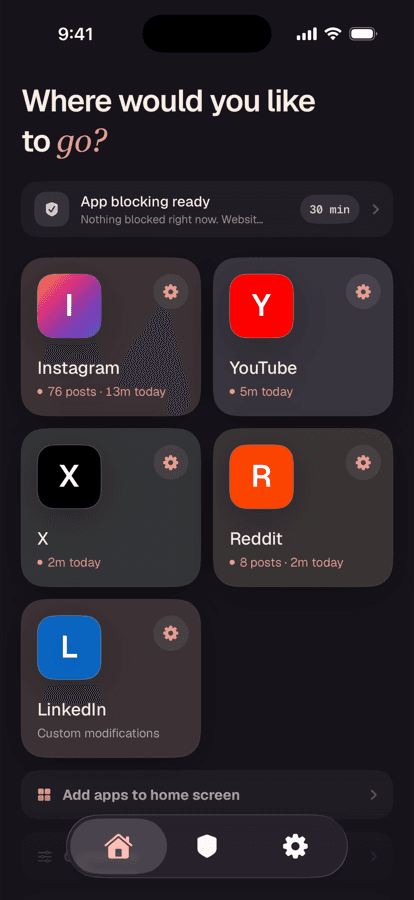
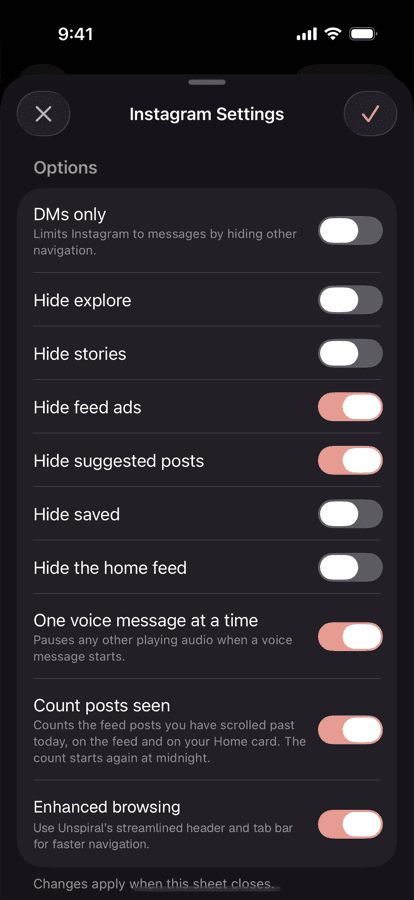
The alternative is to keep the account and remove the feed. Unspiral opens Instagram's mobile site with Reels hidden by default, and its DMs only control limits Instagram to messages by hiding the other navigation. Your account stays live, your messages stay reachable, and the surfaces that made you want to quit aren't there.
Sign in through Unspiral
Tap Instagram on the Home tab and sign in on Instagram's own web page. Unspiral never receives your credentials or your messages.
Turn on DMs only
Tap the gear, then switch on DMs only. Instagram becomes a messaging app. If that's too strict, leave it off and use Hide explore, Hide stories, and Hide the home feed instead.
More on this in how to use Instagram just for messages.
Moving conversations elsewhere
If you're committed to going, the practical migration is unglamorous. Work through your active threads, ask for a phone number or Signal handle, and accept that some contacts won't make the jump. That's not a failure of the process. Some relationships genuinely were platform-shaped.
Deactivate first rather than deleting. Give it a month. If you don't miss it, delete then, with your data download already saved and the 30 day window fully understood.
Frequently asked questions
Do I lose my messages if I delete Instagram?
Yes. Deleting your account removes your access to your DMs permanently once the 30 day grace period ends. Messages you sent remain visible in other people's inboxes, but you lose your own copy and the ability to reply. Request a data download before deleting.
What's the difference between deactivating and deleting Instagram?
Deactivating hides your profile while keeping the account, messages, and username intact, and it's reversible at any time. Deleting is permanent after 30 days, removes your messages, and releases your username.
How do I download my Instagram messages?
Go to Settings, Accounts Center, Your information and permissions, then Download your information. Select Messages and choose HTML format for readability. Meta emails a link when the file is ready, which can take from a few hours to several days.
Can I use Instagram messages without the app?
Yes. Instagram's mobile website supports text, photo, video, and voice messages, group chats, and message requests. Opening it through an app like Unspiral with DMs only enabled limits Instagram to messages. Push notifications and calling are native-app features and aren't available.
Does deleting my account remove messages from other people's inboxes?
No. Messages you sent stay in the recipient's conversation, though they'll show as coming from a deleted user. Deleting removes your copy and your ability to continue the conversation, not theirs.